
What is Revenue Cycle Management in Healthcare?
Have you ever wondered how hospitals and medical practices get paid? The revenue cycle is the process that shows how money moves from the patient or insurance company to the healthcare practice. It starts the moment a patient contacts the practice and continues until the payment is complete. Every step is connected, and if one step is missed, it can slow down the whole process. The revenue cycle is not just about bills, it also confirms that patients get care, insurance is applied correctly, and the practice can continue operating.
The cycle begins with patient registration. At this stage, the office collects personal information, insurance details, and contact information. They check if the patient has coverage and if the insurance will pay for services. Then comes the scheduling of appointments, where the office organizes the patient visit and makes sure any required approvals are in place. After the visit, the care given is documented in the patient’s records. Documentation is used to create codes for billing. Codes are like a language that insurance companies understand to know what services were provided.
Once coding is done, the office creates a claim. This is a bill sent to the insurance company showing the services provided and the cost. Insurance reviews the claim and decides how much it will pay. The patient may also have to pay a portion, such as a copay or deductible. Sometimes claims are denied or need corrections. The office then works to fix problems and resubmit the claim. Finally, the insurance company pays the approved amount, and the patient is billed for any remaining balance.
The revenue cycle management also involves follow-up and analysis. Practices track how long claims take to pay, identify common problems, and make changes to improve efficiency. Some offices use software to monitor every step. Modern healthcare practices rely on technology to make the process faster, reduce mistakes, and confirm payment is accurate. Without an organized revenue cycle, a practice could lose money, patients could be confused, and care could be delayed.
Different types of practices have different challenges. A small office may have fewer claims but less staff to manage them, while a large hospital may process hundreds of claims a day and must carefully manage each one. Understanding the revenue cycle helps staff know what to do at each step, from patient registration to final payment.
The revenue cycle is like a chain. If one link is weak, the whole system slows down. That’s why practices train staff, use electronic records, and carefully track every step. Accurate information, proper coding, correct claim submission, and follow-up are all important parts. Patients, staff, and insurance companies all play a role.
A smooth revenue cycle benefits everyone. Patients know what to pay and when, staff can focus on care rather than chasing money, and practices stay financially healthy. By understanding how money moves in healthcare, everyone can see why each step,from registration, coding, claim submission, and payment, is connected and essential.
Key Steps in the Revenue Cycle
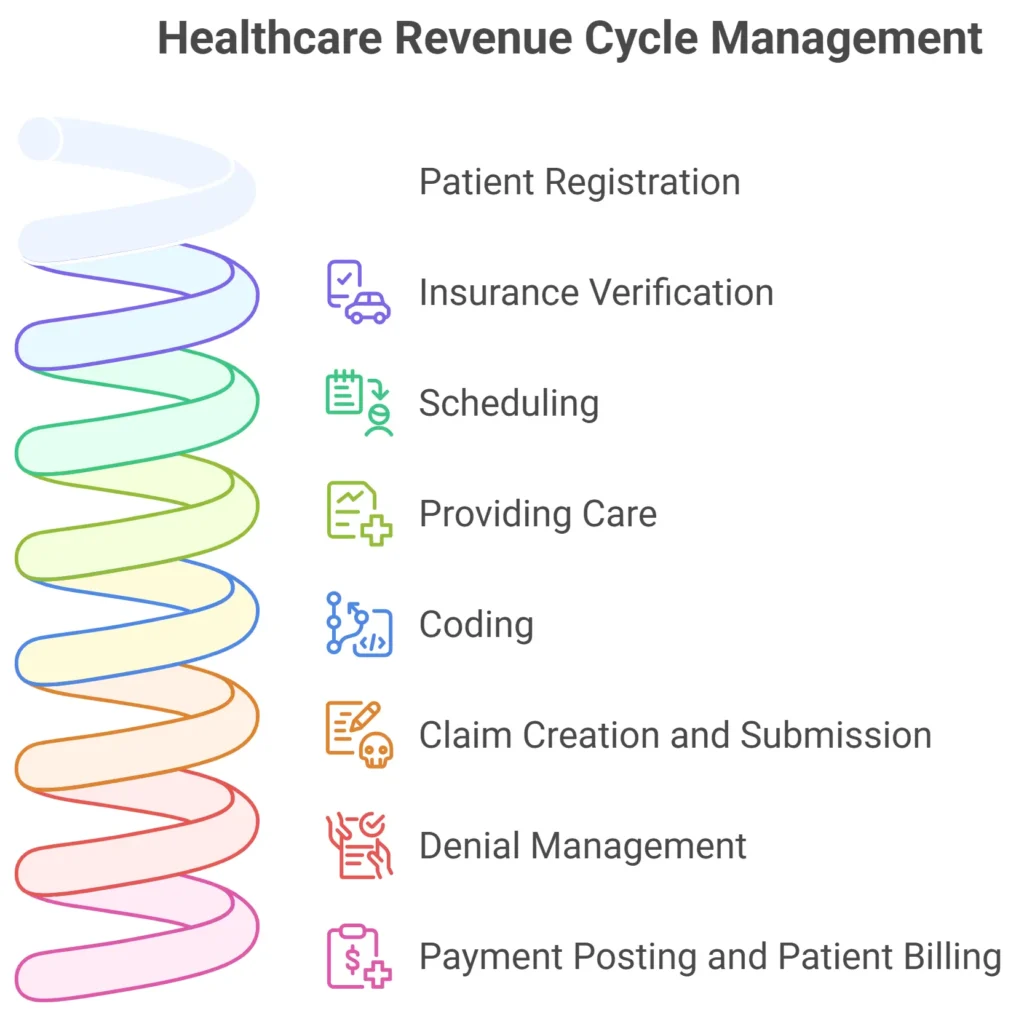
The revenue cycle in healthcare is made up of several connected steps. Each step helps the practice get paid for the care it provides. Understanding these steps helps staff, patients, and even small practices see how money moves from start to finish. Unlike common belief, the revenue cycle is not only about billing. It starts before the patient arrives and continues after the payment is received.
The first step is patient registration . Here, staff collect the patient’s personal information, contact details, and insurance information. They also ask about past medical history that may affect billing or insurance coverage. Registration confirms that the practice knows who the patient is, which insurance is paying, and if there are any pre-authorizations required.
Next is insurance verification . The office checks if the patient’s insurance is active, which services are covered, and what the copay or deductible is. This prevents surprises later. If pre-authorization is needed for a procedure, the staff request it before the appointment. This step saves time and avoids claim denials.
After verification, scheduling happens. Staff choose the right time for the patient’s appointment and make sure the provider is available. Scheduling also considers any equipment or room requirements. For example, a special test may need a specific machine or room.
The fourth step is providing care . The doctor or provider treats the patient, performs tests, or completes procedures. Everything done during this visit is carefully documented.
Documentation includes notes on the patient’s condition, treatments, procedures, and any medications given.
Once the visit is complete, coding converts the services provided into universal codes. These codes are needed to bill insurance. ICD-10 codes describe the diagnosis, and CPT codes describe the procedures. Correct coding confirms that insurance companies understand exactly what care was given.
Next comes claim creation and submission . The practice uses the codes and patient information to make a claim. The claim is sent to the insurance company electronically or by paper. Electronic submission is faster and reduces errors. Staff monitor the claim to confirm it is accepted and processed.
Sometimes, claims are denied or rejected . Denials happen when the insurance finds a problem, like missing information, no authorization, or wrong codes. Staff must correct these issues and resubmit the claim. Proper follow-up confirms payment is received.
Finally, payment posting and patient billing happens. Insurance sends the approved payment to the practice. If the patient owes a copay, deductible, or coinsurance, the office sends a bill. This step completes the revenue cycle, and the practice records the payment in the system.
Below is a simple table showing all key steps and why each is important:
| Step | Description | Why It Matters |
| Patient Registration | Collect personal and insurance details | Correct info confirms claims are accurate |
| Insurance Verification | Check coverage, copays, deductibles, and pre-authorizations | Prevents claim denials |
| Scheduling | Organize appointment, equipment, and room needs | Makes patient visit smooth and timely |
| Providing Care | Document all tests, procedures, medications | Accurate info supports coding and billing |
| Coding | Convert services into ICD-10 and CPT codes | Insurance understands what care was given |
| Claim Submission | Send claim to insurance electronically or by paper | Ensures payment request reaches payer |
| Denial Management | Correct errors and resubmit claims | Helps the practice get paid correctly |
| Payment Posting & Patient Billing | Record insurance payments and bill patient for balance | Completes the cycle and keeps cash flow healthy |
These steps show that the revenue cycle is more than just billing. Each step depends on the previous one, and mistakes early on can cause delays later. Practices that follow each step carefully can reduce denials, receive faster payments, and keep patients happy.
A well-managed revenue cycle helps the office run smoothly. Staff know what to do at each step, patients understand costs, and insurance payments come faster. By focusing on each key step, registration, verification, scheduling, care, coding, claim submission, denial management, and payment posting,the practice confirms that money flows correctly from start to finish.
Collecting Patient Information Accurately
When a patient comes to a medical office, the staff needs to get correct information. This is very important. If the information is wrong, bills may be late. Insurance may not pay. The office may spend more time fixing mistakes.
The first thing staff ask is personal details . They need the patient’s full name, date of birth, phone number, and address. If a name or date is wrong, it can cause big problems later.
Next, staff ask about insurance . They need the company name, ID number, group number, and who is the main person on the plan. If this is wrong, the claim may be denied. The patient may have to pay money they should not pay.
Staff also ask about medical history . They ask about old illnesses, surgeries, allergies, and medicines. This helps the doctor give the right care. It also helps billing staff choose the right codes for insurance. For example, if the patient had a surgery before, the coder knows how to bill correctly.
Many offices use computers or tablets . Patients can enter information online or in the office. The system can check for missing information. It can also verify insurance fast. This helps prevent mistakes.
Sometimes patients forget information or have new details. The staff must check carefully. They may call insurance or ask the patient again. Correct notes help if the office submits a claim or bills the patient.
Here is a simple table to show what information is collected and why it is important:
| Type of Info | Example | Why It Matters |
| Personal Info | Name, DOB, address, phone | Make sure patient can be reached |
| Insurance Info | Company, ID, group | Helps insurance pay correctly |
| Medical History | Past illness, surgeries, allergies | Doctor gives safe care, coding correct |
| Medicines | Current prescriptions | Doctor knows what patient takes |
Collecting correct patient information is the first step of the revenue cycle. It helps scheduling, coding, billing, and payment. If information is right, the office saves time, gets paid faster, and makes the patient happy.
Verifying Insurance Coverage Before the Visit
Before a patient comes to the office, the staff must check if the insurance will pay for the visit. This step is very important. If the insurance is not active or does not cover the service, the patient may have to pay a lot of money. Checking insurance first helps both the patient and the office.
For example, Maria calls a clinic to see a doctor. She gives her insurance card. The office staff checks her insurance online. They see that her plan is active and will cover the visit. They also see that she has a $20 copay. Because of this check, Maria knows what she will pay before the visit.
Insurance verification includes checking:
- If the insurance is active or expired
- What services are covered
- If a copay or deductible applies
- If pre-authorization is needed for the visit or test
Sometimes insurance needs approval before certain procedures. This is called
pre-authorization . For example, John needs a special X-ray. The staff calls his insurance company and gets approval. If they did not check, insurance may refuse to pay, and John would have to pay himself.
Verification can be done in several ways. Some offices call the insurance company. Others use online portals or software. Electronic verification is faster and reduces mistakes. Staff still double-check the patient’s information, like name, date of birth, and policy number. If something is wrong, they fix it before the visit.
Checking insurance also helps the office plan the visit. For example, if the insurance does not cover a certain test, the office can talk to the patient first. They can explain costs or suggest alternatives. This avoids surprises and keeps patients happy.
Here is a simple table showing what insurance verification checks and why it matters:
| Check Type | Example | Why It Matters |
| Active Insurance | Policy is valid today | Insurance will pay |
| Covered Services | Office visit, lab tests | Patient knows what is paid |
| Copay or Deductible | $20 copay, $100 deductible | Patient can prepare money |
| Pre-Authorization | Approval for MRI or surgery | Avoids claim denial |
Verification is not a one-time step. Every patient visit may have different coverage. Some patients change insurance or plans. Staff must check every visit to prevent problems.
When verification is done correctly, the office saves time and money. Patients understand costs. Claims are less likely to be denied. The revenue cycle moves smoothly.
Verifying insurance before the visit is like checking a ticket before a train ride. If the ticket is correct, the ride is smooth. If the ticket is wrong, there are problems and delays. Insurance verification keeps the revenue cycle smooth and confirms both patient and office are ready.
Patient Check-In: Recording Visit Details
When a patient arrives at a medical office, the first step is check-in . This is when the staff records the details of the visit. Check-in is very important because it starts the process of care and billing. If the information is missing or wrong, it can cause delays or errors in the revenue cycle.
At check-in, staff ask the patient to confirm personal information . They check the patient’s full name, date of birth, phone number, and address. Even if this was collected before, confirming it at the visit prevents mistakes.
Next, the staff check insurance information . They make sure the insurance is active, the plan covers the visit, and the copay or deductible is noted. If the insurance has changed since the last visit, the staff update it. This confirms the office can submit claims correctly.
During check-in, staff also record the reason for the visit . For example, a patient may come for a routine checkup, a flu shot, or a follow-up visit. Recording the reason helps the provider prepare and also helps coding staff choose the correct billing codes.
Sometimes, staff also collect health updates . They ask about new medications, allergies, or changes in health since the last visit. This information is important for patient safety and for correct billing. For example, if a patient started a new medicine, the doctor needs to know to avoid errors.
Many offices use electronic check-in now. Patients may enter their information on a tablet or kiosk. The system can check for missing fields and alert staff if anything is wrong. This reduces mistakes and saves time.
Here is a simple table showing what is recorded at check-in and why it is important:
| What is Recorded | Example Details | Why It Matters |
| Personal Information | Name, DOB, address, phone | Makes sure patient is correct |
| Insurance Information | Policy, plan, copay, deductible | Insurance claims are accurate |
| Reason for Visit | Checkup, vaccination, follow-up | Helps provider and coding |
| Health Updates | New medicine, allergies, symptoms | Keeps patient safe and coding correct |
Check-in is also the time when staff explain office rules . They may tell the patient about parking, waiting times, or forms to complete. They also make sure the patient signs any required consent forms.
Good check-in helps the office run smoothly . Staff can prepare the provider, verify insurance, and start the revenue cycle correctly. It also helps patients feel welcome and ready for their visit.
If check-in is done carefully, mistakes in coding or billing are reduced. Patients know what to expect, and the office can avoid denied claims. Every step in the revenue cycle depends on correct check-in.
Medical Coding: Translating Care into Numbers
After the patient visit, the office needs to translate what the doctor did into numbers . This is called medical coding . Coding is very important because insurance companies only understand numbers and codes, not doctor notes. Correct coding confirms the practice gets paid and the patient’s insurance works correctly.
Medical coding has two main types: diagnosis codes and procedure codes . Diagnosis codes (ICD-10 codes) tell why the patient came. For example, if John has a cough and fever, the coder uses a code for respiratory infection . Procedure codes (CPT codes) tell what the doctor did. For example, if the doctor gave John a flu shot, the coder uses a code for vaccination.
Let’s see an example. Maria came for a checkup. The doctor checked her blood pressure, gave her a flu shot, and talked about diet. The coder will assign one code for the checkup, one code for the flu shot, and may add another cod e if counseling is billable. These codes are then sent to insurance.
Coding must be accurate . If the wrong code is used, insurance may deny payment . For example, if a coder uses a code for a serious illness but the patient only had a routine visit, insurance may refuse to pay. This can cause delays and extra work for staff.
Below is a simple table showing coding types and examples:
| Code Type | Example | Purpose |
| Diagnosis Code | ICD-10: J06.9 (respiratory infection) | Shows why patient came |
| Procedure Code | CPT: 90471 (vaccine injection) | Shows what doctor did |
| Modifier Code | 25 (separate service same day) | Explains special situations |
Sometimes, coders also use modifier codes . Modifiers explain special situations. For example, if a patient has two procedures on the same day, the coder may use a modifier to show both are separate services.
Good coding also protects the office from audits . Insurance companies may check claims to make sure they match the patient’s visit. If codes match the documentation, the claim is approved faster. If codes are wrong, the office may need to send explanations and correct errors.
Coding can be done by hand or with software . Many offices use electronic systems that suggest codes based on doctor notes. Staff still review the codes to make sure they are correct. Technology makes coding faster and reduces mistakes.
Medical coding is like turning the doctor’s work into a language insurance companies understand. Diagnosis codes explain why the patient came. Procedure codes explain what the doctor did. Modifier codes explain special situations . Accurate coding keeps the revenue cycle smooth, confirms payment, and reduces problems for the patient and office.
Claim Creation: Turning Codes into Bills
After coding, the next step in the revenue cycle is claim creation . This means turning the codes and patient information into a bill that goes to the insurance company. Claims are like a formal request: “Please pay us for the care we gave.” If claims are done wrong, the office may not get paid, and patients may be confused about bills.
The first step in creating a claim is collecting all information . Staff use the patient’s personal information, insurance details, and the medical codes from the visit. They also include the date of service , the provider’s name, and the office address. Every detail matters because insurance will check all of it.
Once all information is ready, staff enter it into a claim form . Most offices use electronic claims . Electronic claims are faster and have fewer mistakes. Some small offices still send paper claims, but electronic claims are now the standard.
Let’s see an example. John went to the doctor for a flu shot and a blood test. The coder gave the right diagnosis and procedure codes. The staff put these codes, his insurance info, and visit date into the claim. The claim is now ready to send.
Before sending, the staff do a final check . They make sure the codes match the visit, the patient’s name and insurance number are correct, and nothing is missing. Even small mistakes, like a wrong digit in the insurance ID, can cause the claim to be rejected.
Here is a simple table showing what is included in a claim:
| Claim Part | Example Details | Why It Matters |
| Patient Info | Name, DOB, address | Insurance knows who was treated |
| Insurance Info | Company, policy, group number | Ensures payment |
| Diagnosis Codes | ICD-10: J06.9 (respiratory infection) | Explains why patient came |
| Procedure Codes | CPT: 90471 (vaccine injection) | Explains what doctor did |
| Date & Provider Info | 01/05/2026, Dr. Smith | Shows when and who treated |
After the claim is complete, it is submitted to the insurance company . Electronic claims usually go immediately and are checked by software. Paper claims take longer and must be mailed.
Sometimes insurance rejects or denies a claim. Rejections are usually small mistakes, like missing information. Denials happen when insurance says the service is not covered or coded incorrectly. Staff then correct the claim and resubmit . Quick follow-up helps the office get paid faster.
Creating claims correctly saves the practice time and money. It also helps patients because they don’t get confused with incorrect bills. Accurate claim creation keeps the revenue cycle moving smoothly from start to finish.
Claim creation is the bridge between the care a patient gets and the money the office receives. Staff use correct patient info, insurance info, and medical codes to make a claim. They check everything carefully and send it to insurance. When done right, claims lead to faster payments and fewer problems for the office and the patient.
Handling Denied or Rejected Claims
Sometimes, after a claim is sent to the insurance company, it is denied or rejected . This means the insurance will not pay the bill at first. Denials and rejections are very common, but the office can fix them. Handling these problems quickly is very important to get paid and keep patients happy.
A rejected claim happens when there is a small mistake. For example, the patient’s date of birth is wrong, the insurance ID has a wrong number, or a code is missing. The office staff can check the mistake, correct it, and resubmit the claim . Rejected claims usually get paid faster because the problem is small.
A denied claim happens when insurance says the service is not covered or coded incorrectly. For example, if a patient’s plan does not cover a special test, the claim may be denied. Another reason could be that the office used the wrong code for the service.
Staff follow these steps to handle denied or rejected claims:
- Check the reason – Insurance always gives a reason. Staff read it carefully.
- Verify patient info – Make sure name, date of birth, address, and insurance ID are correct.
- Check codes – Make sure the diagnosis and procedure codes match the visit.
- Correct errors – Fix mistakes like wrong codes or missing information.
- Add documents if needed – Sometimes insurance asks for extra papers, like doctor notes or test results.
- Resubmit claim – Send the corrected claim back to insurance.
- Follow up – Call insurance to check the status and make sure it is processed.
Here is a simple table to show how to fix rejected or denied claims:
| Claim Problem | Example | How to Fix |
| Rejected Claim | Wrong patient DOB | Correct info and resubmit |
| Rejected Claim | Missing code | Add code and resubmit |
| Denied Claim | Service not covered | Check insurance or get approval |
| Denied Claim | Wrong procedure code | Correct code and resubmit |
| Denied Claim | Missing documents | Attach doctor notes and resubmit |
Handling denied or rejected claims quickly is very important. If the office waits too long, insurance may refuse to pay later. Patients may also get confused or worried if their bills are delayed. Good handling saves money, time, and frustration for both the office and patient.
Staff training is important. Everyone must know how to read denial reasons, find errors, and fix claims. Software can help by highlighting mistakes and tracking claims. Technology makes it easier to handle many claims every day.
Denied and rejected claims are problems that happen often. Rejections are small mistakes, and denials happen when insurance says no. The office fixes the problem by checking patient info, codes, and documents, then resubmits the claim. Quick and correct handling keeps the revenue cycle smooth and helps the office get paid faster.
Patient Billing: Sending Statements and Collecting Payments
After insurance pays its part, the office sends a bill to the patient for any remaining amount. This step is called patient billing . It is very important because it helps the office get full payment and keeps the revenue cycle moving.
The patient bill shows several things. It has the services the doctor gave , the amount insurance paid , and the amount the patient owes . Sometimes the patient owes a copay , a deductible , or a non-covered service . The bill should be clear and easy to understand.
Before sending a bill, staff check that insurance payments are correct . If insurance paid too much or too little, the office fixes it first. Then, they make sure the patient balance is accurate . Correct bills prevent confusion and complaints.
Bills can be sent in different ways . Some offices send paper bills in the mail. Many offices now send electronic bills by email or patient portal. Electronic bills are faster, cheaper, and easier for patients to pay online.
When sending a bill, staff include clear instructions. They explain how to pay , where to pay , and what to do if the patient has questions . Some offices offer payment plans for patients who cannot pay all at once. This helps patients and keeps the office from losing money.
Sometimes, patients have questions or disputes . For example, a patient may not understand why a service is not fully covered by insurance. Staff must politely explain the bill and help the patient understand. Clear communication builds trust and reduces stress for both patients and office staff.
Patient billing also includes record keeping . The office must keep track of all bills sent, payments received, and any outstanding balances. This helps the office follow up with patients who have not paid yet and confirms that no money is lost.
Collecting payments can be done in the office, online, or by mail . Some offices accept cash, credit cards, checks, or online payments . Giving patients options makes it easier for them to pay and improves cash flow.
Good patient billing improves the revenue cycle . If the office sends clear, correct bills and helps patients pay, money comes in faster. Patients are happier because they understand their costs, and the office spends less time fixing mistakes or chasing payments.
Patient billing is the step after insurance pays. Staff check payments, create a clear bill, send it to the patient, and help them pay. This step keeps the revenue cycle moving smoothly, helps the office get full payment, and keeps patients satisfied.
Payment Posting: Recording Payments Correctly
After the patient and insurance pay, the office needs to record the payments in their system. This step is called payment posting . Payment posting is very important because it tells the office how much money came in and how much is still owed. If this is done wrong, the office may lose money or confuse patients.
When staff post payments, they check who paid , insurance, patient, or both. They also record how much was paid and the date of payment . For example, if insurance pays $80 for a visit and the patient pays $20 copay, the system must show $100 total, $80 insurance, $20 patient.
Correct payment posting helps staff see which bills are still unpaid . They can easily find patients who still owe money or insurance claims that are not paid. This saves time and keeps the revenue cycle organized.
Payment posting also helps the office reconcile accounts . Reconciliation means checking that the money in the system matches the money in the bank. If something does not match, staff can find mistakes and fix them quickly.
Sometimes insurance sends partial payments . For example, insurance may pay only part of a procedure or deny a portion of the claim. Staff must post the amount paid and mark the rest as patient responsibility . They may need to send a bill to the patient for the remaining balance.
Many offices now use electronic payment posting systems . These systems automatically post insurance payments when the electronic remittance advice is received. Staff still review the payments to make sure they are correct. Technology reduces mistakes and saves time.
Payment posting also includes tracking adjustments . Sometimes the insurance adjusts payments because of contracts, discounts, or corrections. Staff must record these adjustments accurately so the accounts reflect the true balance.
Good payment posting keeps financial reports accurate . The office can see how much revenue is coming in, which services earn the most money, and where there are unpaid balances. This helps the practice plan its budget and manage expenses.
Payment posting is recording every dollar that comes from insurance and patients. Staff must note who paid, how much, and when. They also track adjustments and unpaid balances. Accurate payment posting confirms the office knows exactly what money is received, prevents mistakes, and keeps the revenue cycle smooth and organized.
Patient Follow-Up: Confirming All Payments Are Complete
After payments are posted, the office may still need to follow up with patients to make sure all money is collected. This step is called patient follow-up . Follow-up is very important because some patients may not pay on time, or there may be unpaid balances from insurance or partial payments.
Staff start by checking unpaid balances in the system. They look for patients who still owe money after insurance has paid. They also check for payments that were posted incorrectly or for missing payments.
Next, the office contacts the patient . This can be done by phone, email, or mail. Staff politely explain the balance, the services billed, and how to pay. Clear communication helps patients understand what they owe and avoids confusion.
Sometimes patients need payment plans . If a patient cannot pay the full amount, staff can set up a schedule to pay in smaller amounts. This helps the office collect money without making it hard for the patient.
Follow-up also includes checking insurance payments . Sometimes insurance delays payments, sends partial payments, or denies part of a claim. Staff contact insurance companies to resolve these issues and make sure the patient’s balance is correct.
Staff may also send reminders . These can be letters, emails, or automated messages. Reminders keep patients aware of unpaid balances and encourage them to pay quickly.
Good follow-up prevents lost revenue . If the office does not follow up, some money may never be collected. Follow-up also helps patients avoid surprises and keeps a good relationship between the office and patient.
Patient follow-up is checking all payments after the visit. Staff review unpaid balances, contact patients, explain bills, set payment plans if needed, and check insurance payments. Proper follow-up confirms the office collects all money owed and keeps patients satisfied.
Reporting and Analytics: Tracking Revenue Cycle Performance
After payments are posted and follow-ups are done, the office needs to check how well the revenue cycle is working . This is called reporting and analytics . Reporting means making lists and summaries of money coming in. Analytics means looking at the lists to see problems and find ways to improve.
Offices create reports to show how much money was billed , how much was paid , and how much is still unpaid . Reports also show how long it takes for insurance to pay and which patients have unpaid balances . This information helps staff plan and make better decisions.
Analytics can answer questions like: Are patients paying on time? Is insurance slow in paying claims? Which services earn the most money? These answers help the office know what is working and what needs to improve.
Many offices now use software to make reports automatically. The software can generate charts and graphs showing trends. For example, the office can see that flu shot claims are paid quickly, but lab tests take longer. This helps staff focus on problem areas.
Reports also help the office track denied or rejected claims . Staff can see which codes or services cause denials most often. Then they can train staff to code correctly or submit better claims. This reduces lost revenue and keeps the revenue cycle smooth.
Analytics also show patient payment trends . For example, the office can see which patients often need reminders or payment plans. This helps staff plan follow-ups and improve collection strategies.
Good reporting and analytics improve revenue . By knowing where delays or problems are, the office can take action. This prevents mistakes, collects more money, and makes patients happier because bills are correct.
Reporting and analytics help offices track money coming in, payments posted, and problems with claims or patient balances. Reports show trends, identify delays, and highlight issues with coding, insurance, or patient payments. Analytics help the office fix problems and improve the revenue cycle. Using reports and analytics keeps the practice organized, helps collect more money, and improves patient satisfaction.
Technology in the Revenue Cycle: How Software Helps
Technology is now a very big part of how healthcare offices handle money. Software helps staff do many jobs in the revenue cycle, like billing, coding, claims, payment posting, patient follow-up, reporting, and tracking money. Before software, offices had to do all these tasks by hand. Staff wrote bills on paper, sent them to insurance, waited weeks for payment, and then manually checked each payment. This was slow, confusing, and mistakes happened often.
With software, all steps become faster and easier. Staff can enter patient visits, select the correct procedure or diagnosis codes, and the software can check for errors automatically. This prevents wrong claims and saves a lot of time. Coding is easier because software has built-in libraries of ICD-10 and CPT codes. Staff do not need to memorize hundreds of codes. The software shows suggestions for codes based on the procedure or diagnosis, and it can warn if a code is missing or incorrect. Insurance claims are also much faster now. Instead of sending claims by mail, staff use software to send electronic claims. The software tracks the status of each claim. It can show if the insurance paid, delayed, or denied the claim. This helps staff follow up quickly.
When a claim is denied, software gives details about why it was denied, such as wrong codes, missing documents, or coverage issues. Staff can then correct the errors and send the claim again. This reduces lost money and keeps the revenue cycle smooth. Payment posting is another part of the revenue cycle that software helps with. When insurance or patients pay, the software records the payments automatically. Staff can see what has been paid, what is still unpaid, and if any partial payments were made. This makes accounts accurate and prevents mistakes. If a payment is missing, staff can check the software to see if the insurance has not paid or if the patient needs to pay the balance. Some software even allows automatic payment posting.
It can connect to the bank or insurance portal and update payments directly, reducing the need for staff to enter every payment manually. Patient follow-up is much easier with software. Many healthcare offices now use online portals for patients. Patients can log in, see their bills, pay online, and get reminders if the balance is due. This reduces late payments and makes the process simple for both patients and staff. Software also helps offices track reports and analytics. Staff can see which services bring the most revenue, which claims are denied most often, how long it takes insurance to pay, and which patients need follow-up for unpaid balances.
Reports can be daily, weekly, or monthly. This helps staff know where the office is making money and where problems exist. When trends show problems, staff can take action. For example, if many claims for lab tests are denied, staff can check coding for those services and correct mistakes before sending future claims.
Software also helps with compliance. Healthcare offices must follow rules like HIPAA, payer requirements, and billing regulations. Some software can alert staff if something is missing or wrong, like missing patient information or wrong codes. This reduces mistakes and prevents fines. Another important thing is automation . Software can send reminders to patients automatically, alert staff about unpaid claims, and generate reports without manual work. Automation saves time and keeps the revenue cycle moving smoothly. Even small offices benefit from software.
They do not need large billing teams because software handles repetitive work. Staff can focus on helping patients and checking payments rather than entering every detail by hand. Large offices also benefit because software can handle thousands of claims every day without errors. Using software also helps offices plan for the future . Reports and analytics show trends over time. Staff can see which services are growing, which are slow, and how payments change month to month.
This helps offices budget, hire staff, and manage resources better. Modern software often combines many features in one place. For example, it can do coding, claims, payment posting, patient communication, reporting, and compliance checks all together. This reduces the need to use multiple programs and prevents mistakes from transferring information manually. Software also reduces the stress of managing revenue. Staff feel confident that claims are correct, payments are tracked, and patient follow-up is done. Errors are fewer, and patients have fewer complaints.
Many offices use software like Simple Practice, Kareo, Athenahealth, Epic, Cerner, NextGen, Greenway Health, Medisoft, PracticeSuite, DrChrono, eClinicalWorks, Allscripts, Amazing Charts, Meditech, MediTouch, McKesson, AdvancedMD, GE Healthcare, Nuemd, PrognoCIS, and CareCloud . These software tools help different parts of the revenue cycle. Some focus on coding and billing, others on patient communication, and some on reporting and analytics. Offices can choose the software that works best for their size and needs. Technology also allows staff to work from anywhere. Some software is cloud-based, so staff can check claims, post payments, and communicate with patients even if they are not in the office. This is useful for remote billing teams or during emergencies. Another advantage is accuracy.
Software reduces human mistakes in coding, posting payments, or submitting claims. Staff still check the work, but software does the repetitive calculations automatically. Security is also better with software. Patient and payment information is stored safely, with access controls to prevent unauthorized use. Many software have encryption and backup features so information is safe even if the computer fails.
Using software also improves patient experience. Patients can pay online, receive clear bills, and get reminders. They are less likely to have questions or complaints, which saves time for staff. In short, software helps every step of the revenue cycle. It makes billing, coding, claims, payment posting, patient follow-up, reporting, analytics, compliance, and security much easier.
Staff spend less time on repetitive tasks and more time helping patients. Offices get paid faster, make fewer mistakes, and run more smoothly. Technology has made the revenue cycle faster, simpler, and more reliable for both small and large practices. Using software like as discussed above makes the work easier, saves time, and confirms the office collects all money owed while keeping patients happy.
Common Challenges in the Revenue Cycle and How to Solve Them
The revenue cycle in healthcare has many problems that slow down payments and create stress for staff. One of the biggest challenges is wrong patient information . If a name, insurance number, or date of birth is wrong, insurance can reject the claim. This causes delays and extra work. Another problem is insurance denials . Claims are denied when codes are wrong, documents are missing, or services are not covered. Staff must read denial messages, fix errors, and send the claim again. This takes time and can delay payment for weeks. Slow insurance payments are also common. Some insurance companies take a long time to pay, even when the claim is correct. This affects cash flow and makes it hard for practices to manage expenses. Patient payments can also be slow. Patients may not understand their bills, forget to pay, or wait too long. Poor communication makes this worse. Another challenge is coding mistakes . Using the wrong diagnosis or procedure code can cause claim rejection. Staff need training to understand coding rules.
Missing documentation is another issue. Insurance often asks for notes, test results, or reports. If these are missing or late, the claim is denied. Staff workload is also a challenge. When staff are busy or short-handed, follow-ups are delayed and errors increase.
Compliance rules add more difficulty. Practices must follow billing rules and privacy laws. Mistakes can lead to fines or audits. Late payment posting creates confusion. If payments are not posted on time, accounts look unpaid when they are not. Poor tracking of claims is another problem. If staff do not track claim status, unpaid claims may be forgotten. All these issues slow down the revenue cycle and reduce income.
Common Revenue Cycle Challenges
- Wrong patient information
- Insurance claim denials
- Slow insurance payments
- Late patient payments
- Coding errors
- Missing medical documents
- High staff workload
- Poor follow-up on claims
- Compliance mistakes
- Late payment posting
- Duplicate billing errors
- Patient confusion about bills
- Poor communication with insurance
- Lack of staff training
- No clear tracking of unpaid claims
Solving revenue cycle problems requires careful work and clear processes. Staff should verify patient information before visits to prevent claim errors. Claims should be reviewed before submission to reduce denials. When a claim is denied, staff should act quickly and resubmit after fixing the problem. For slow payments, regular follow-up with insurance helps keep claims moving. Clear patient bills and simple explanations help patients pay on time. Training staff on coding rules reduces mistakes and improves accuracy. Keeping documents organized confirms quick responses to insurance requests. Good internal communication helps staff stay updated on claim status. Posting payments on time keeps accounts accurate. Regular reviews of unpaid claims prevent lost revenue. Following billing rules and privacy laws protects the practice from penalties. Managing staff workload and assigning clear roles improves efficiency. Simple reports help track where money is delayed. When practices focus on these solutions, the revenue cycle becomes smoother. Payments come faster, errors decrease, and staff feel less pressure. A strong revenue cycle helps practices stay financially healthy while allowing them to focus more on patient care instead of billing problems.
The Future of the Revenue Cycle and What Healthcare Must Prepare For
The future of the revenue cycle in healthcare is changing fast, and practices must understand how money movement will work in the coming years. The revenue cycle is no longer only about sending claims and getting paid. It is becoming a full financial control process that starts before the patient visit and continues long after care is given.
In the future, patient data accuracy will become more important than ever. Insurance companies are becoming stricter, and even small mistakes in patient demographics, coverage dates, or authorization details can stop payment completely. This means practices must prepare for deeper verification processes before appointments.
Another major change is the way claims will be reviewed. Insurance companies are moving toward automated claim reviews using advanced rules. These rules check medical necessity, coding logic, frequency limits, and documentation match. If something does not match exactly, the claim will not be paid. This makes documentation quality extremely important.
Providers must clearly document why a service was needed, what was done, and how it matches the diagnosis. The future revenue cycle will also depend heavily on data flow between departments. Front desk, clinical staff, coding teams, and billing staff must work as one connected unit. If one step fails, the entire revenue process slows down. Another big change is the growing role of patient financial responsibility. Insurance plans now shift more costs to patients through deductibles, copays, and coinsurance.
This means practices cannot depend only on insurance payments. They must prepare to collect more money directly from patients. Clear financial policies, early cost discussions, and accurate estimates will become standard. If patients do not understand their responsibility, payment delays will increase. Another future challenge is payment timing pressure. Practices will need to shorten the time between service and payment to survive.
Holding unpaid claims for long periods will damage cash flow. This means faster claim submission, faster denial response, and faster patient billing will be required. Revenue cycle teams will need strong monitoring of aging accounts, especially those over 30, 60, and 90 days. Regulatory pressure will also increase. Government agencies and payers will expect full compliance with billing rules, privacy laws, and reporting standards. Audits will become more common, and penalties will be higher. Practices must prepare by maintaining clean records, proper coding, and accurate billing history.
Another technical shift is value-based payment models. In the future, payment may depend not only on services provided but also on outcomes, quality scores, and patient satisfaction. This adds complexity to the revenue cycle because payment may be delayed until performance data is reviewed. Practices must track quality measures and connect them to revenue expectations. Data reporting accuracy will directly impact income. The revenue cycle will also become more predictive. Practices will analyze historical payment patterns to predict future revenue. This helps with budgeting and staffing decisions.
However, this requires clean data and consistent processes. Any error in data entry can affect financial forecasting. Another important future focus is denial prevention rather than denial management. Instead of fixing denials after they happen, practices must prevent them before submission. This means strict checks at the front end, strong coding validation, and complete documentation. The future revenue cycle will also require higher staff skill levels. Billing staff must understand insurance logic, medical coding, compliance rules, and financial analytics. Basic billing knowledge will not be enough.
Continuous training will be required. Patient communication will also change. Patients will expect clear, fast, and simple billing information. Confusing statements and delayed bills will increase complaints and reduce payment rates. Transparency will become a financial requirement, not a choice. Security will also be important. Revenue data includes sensitive patient and payment information. Any breach can cause financial loss and legal trouble.
Practices must protect data integrity and access control. Finally, the future revenue cycle will demand speed, accuracy, and coordination. Practices that prepare early by strengthening processes, training staff, improving documentation, and monitoring performance will survive
and grow. Those who ignore these changes will fall behind. Payments will slow down. Claims will fail. Compliance problems will grow. Money will stop moving the way it should. A practice that cannot control its revenue cycle cannot survive.
Practices that understand this shift will move forward with control and confidence. Those that do not will struggle to stay alive. In the future of healthcare, mastering the revenue cycle is not optional. It is the difference between growth and collapse.